|
|
 |
| Supplier of cables for Toronto & Markham including: Cat 5e, Cat 6, Fiber Optic, Auido Video, DVI, USB, firewire and much more! |
|
Network
Cables Cable
Management Telephone
Cables Computer
Cables Coax
Products
Audio
Video Cables Tools
and Testers |
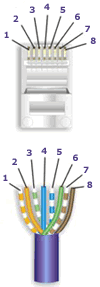
Notes for wiring diagrams above: Patch Cable Assembly Instructions
Notes Regarding Making Category 5 Patch Cable 1) The RJ-45
plugs are normally made for either solid conductors or stranded
conductors. It is very important to be sure that the plug that
you use matches the conductor type. It is extremely difficult
to tell the difference between the two by looking at them. When
you buy these plugs, be sure to categorize, and store them carefully.
Using the wrong type can cause intermittent problems.
How to Make a Category 6 / Cat 6 Patch Cable
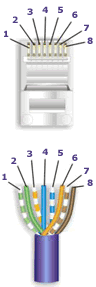
Notes for
wiring diagrams above: Patch Cable Assembly Instructions
Notes
Regarding Making Category 6 Patch Cable 2) Ordinarily, it would be taboo to untwist the pairs of any category 6 cable. The one exception to this rule is when crimping on RJ-45 plugs. It would be impossible to insert the wires into the channels without first untwisting and straightening them. Be sure not to extend the un-twisting, past the skin point. 3) If the completed assembly does not pass continuity, you may have a problem in one, or both ends. First try giving each end another crimp. If that does not work, then carefully examine each end. Are the wires in the proper order? Do all of the wires fully extend to the end of the connector? Are all of the pins pushed down fully. If the pins are not fully pushed down than it is possible that your crimper may require adjustment or replacement. Cut off the suspected bad connector, and re-terminate it. If you still have a problem, then repeat the process, this time giving more scrutiny to the end that was not replaced. 4) It is good to be prepared to make your own patch cables. There may be many instances where you may fall short on supply, and making a cable will surely get you out of a jam. However, there comes a point where the practicality curve will lead you to factory made cables. Making several cables can be very labor intense. Factory made cables typically have better tolerances, and consequently have better quality than field made cables. Controversies
and Caveats: Category 5, 5E, and Cat 6 Patch Cables Re-use of old cables - We have seen this happen time and time again. Perfectly good patch cables that have been working fine for years, get removed from their installation, and re-installed on the same, or different network. The result can be a nightmare. What happens is that the cable, over time, adapts to the way that it is bent in it's original installation. When these cables are removed and re-installed, they can either completely loose their connection, or develop intermittent problems. This is due to stresses that may be opposite to what they were originally subject to. If the integrity of your network is more valuable than the price of new patch cables, then we strongly suggest that you use brand new cables for all closet cleanups, network moves, etc. Stranded vs. Solid wire - Almost all patch cables that are made have stranded wire. Stranded wire is normally specified for use in patch cables due to it's superior flexibility. There has been some talk recently, in the technical sector of the structured wiring community, regarding the possible use of solid conductors for patch cables. The reason for the spotlight on solid wire is that it is supposedly more stable, under a variety of conditions. Please note that we now offer custom solid copper category 5E patch cables in Plenum insulation in lengths of up to 295 feet. These cables are suitable for use in air handling (Plenum) ceilings and environments.
Category 5E Installation - Do's and Don'ts Do
Category
5 Cable (UTP) (Unshielded Twisted Pair) Category
5 E Cable (enhanced)
Wiremap
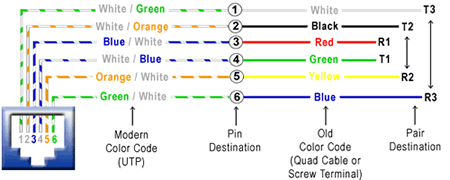
How to Wire a Phone Jack (Voice or Telephone RJ-11 thru RJ-14) Telephone wiring for a phone outlet is typically either 1, 2 or 3 pairs (2, 4, or 6 conductor). Most cable nowadays is UTP (unshielded twisted pair). There may be instances where you may need to connect to or transpose from the old "quad" cable. The diagram below provides the transposition between these standards. Pair 1 (T1
& R1)
Pair 2 (T2
& R2) Pair 3 (T3
& R3)
USOC (Universal
Service Ordering Codes) RJ (RJ-11,
RJ-45 Etc.)
Getting Started in Fiber Optics What is
"Fiber Optics"? By the mid-80s, fiber was replacing all the telco copper, microwave and satellite links. In the 90s, CATV discovered fiber and used it first to enhance the reliability of their networks, a big problem. Along the way, the discovered they could offer phone and Internet service on that same fiber and greatly enlarged their markets. Computers and LANs started using fiber about the same time as the telcos. Industrial links were among the first as the noise immunity of fiber and its distance capability make it ideal for the factory floor. Mainframe storage networks came next, the predecessors of today's fiber SANs (storage area networks.) Other applications developed too: aircraft, ship and automobile data busses, CCTV for security, even links for consumer digital stereo! Today fiber optics is either the dominant medium or a logical choice for every communication system. Which Fiber
Optics? Just like "wire" which can mean lots of different things - power, security, HVAC, CCTV, LAN or telephone - fiber optics is not all the same. And this can be a big source of confusion to the novice. Lets define our terms. Outside
Plant (OSP) Outside plant installations are all singlemode fiber (we'll define the fiber types in the next chapter), and cables often have very high fiber counts, up to 288 fibers. Cable designs are optimized for resisting moisture and rodent damage. Installation requires special pullers or plows, and even trailers to carry giant spools of cable. Long distances mean cables are spliced together, since cables are not longer than about 4 km (2.5 miles), and most splices are by fusion splicing. Connectors (SC, ST or FC styles) on factory made pigtails are spliced onto the end of the cable. After installation, every fiber and every splice is tested with an OTDR. If this sounds like
big bucks, you are right! The installer usually has a temperature controlled
van or trailer for splicing and/or a bucket truck. Investments in fusion
splicers and OTDRs can add up to over $100,000 alone. Premises
Cabling Splicing is practically unknown in premises applications. Cables between buildings can be bought with double jackets, PE for outside plant protection over PVC for building applications requiring flame retardant cable jackets, so cables can be run continuously between buildings. Today's connectors often have lower loss than splices, and patch panels give more flexibility for moves, adds and changes. Most connectors are ST style with a few SCs here and there. Termination is by installing connectors directly on the ends of the fibers, primarily using adhesive technology or occasionally some other variety of termination method. Testing is done by a source and meter, but every installer should have a flashlight type tracer to check fiber continuity and connection. Unlike the outside plant technician, the premises cabler (who is often also installing the power cable and Cat 5 for LANs too!) probably has an investment of less than $2,000 in tools and test equipment. There are thousands of cabling installers who do fiber optic work. They've found out it isn't "rocket science," and their small initial investment in training, tools and test equipment is rapidly paid back. The Installers Fiber vs
Copper If you are already terminating copper wire then you are well along in learning to install fiber. Twenty years ago, fiber was just being introduced and required PhD's from Bell Labs to install it while copper wire was easy to install. Today it is often the opposite. Because fiber is so powerful, at today's network speeds fiber is hardly working hard at all and can look to the future of ten gigabit speeds with confidence. Copper on the other hand, can handle gigabit Ethernet but only if it is carefully installed and tested with very expensive test equipment and components. Even the experts have to be very careful because it has little "headroom". Also, if you are currently working with copper, you also have to know that LAN copper cable is delicate. It only has a 25 pound pulling tension limit and kinks will ruin the high speed performance. With fiber - even though it's glass fiber - it has more strength and greater tolerance to abuse than copper wire. (What do you think gives the strength to your "fiberglass" boat?) OK, you might say, I can buy everything you've said so far, but isn't fiber more expensive? Telcos and CATV operators use fiber because it's much cheaper. They optimize their network to take advantage of fiber's speed and distance advantages. In LANs, you need to follow the new EIA/TIA 568 B.3 standard to optimize the fiber usage, and then it can be cheaper than copper. How about test equipment? Guess again Fiber optic test equipment costs lots less than Cat 5e/6 testers. See Networks where we will show you how the setup for a fiber network has some surprising savings. The Secret
To Success In Fiber Optics Is Training! Where to
get training? Standards Standards like EIA/TIA 568B ( from the Electronic Industries Alliance/ Telecommunications Industry Association) which covers all of the things you need to know to install a standard premises cabling network are good guidelines for designs, but just guidelines - they are not mandatory. Standards for fiber optic components and testing have been set by several groups, but most in the US follow the EIA/TIA developed FOTP's (fiber optic test procedures) for testing. Some of the EIA procedures are also called OFSTP (optical fiber system test procedures) like OFSTP-14 for the installed cable plant. Standards for optical power measurements are set by NIST (the US National Institute of Standards and Technology) The only common mandatory standard is the NEC 770 (National Electrical Code). The NEC specifies fire prevention standards for fiber optic cables. If a cable doesn't have a NEC rating - don't install it - it won't pass inspection! Before we
get started - Safety First! The real safety lecture will always be about small scraps of glass cleaved off the ends of the fibers being terminated or spliced. These scraps are very dangerous! The cleaved ends are extremely sharp and can easily penetrate your skin. If they get into your eyes, they are very hard to flush out. Don't even think about what happens if you eat one. Safety glasses are a must! Always follow these rules
when working with fiber. Fiber optic splicing and termination use various chemical adhesives and cleaners as part of the processes. Follow the instructions for use carefully. Remember, even simple isopropyl alcohol, used as a cleaner, is flammable. Zero Tolerance
for Dirt 1. Try to work in a clean
area. Avoid working around heating outlets, as they blow dust all over
you. [ TOP ] In the telcos, singlemode fiber is used to connect long distance switches, central offices and SLCs (subscriber loop carriers, small switches in pedestals in subdivisions or office parks or in the basement of a larger building). Practically every telco's network is now fiber optics except the connection to the home. Fiber to the home is not yet cost effective - especially since most homes do not want (nor are willing to pay) for the high speed services that would justify fiber optics. CATV companies "overbuild" with fiber. They lash fiber cable onto the aerial "hardline" coax used for the rest of the network or pull it in the same conduit underground. The fiber allows them to break their network into smaller service areas that prevent large numbers of customers from being affected in an outage, making for better service and customer relations. The fiber also gives them a return path which they use for Internet and telephone connections, increasing their revenue potential. LANs (local area networks) use fiber optics primarily in the backbone but increasingly to the desk. The LAN backbone often needs longer distance than copper cable (Cat 5/5e/6) can provide and of course, the fiber offers higher bandwidth for future expansion. Most large corporate LANs use fiber backbones with copper wire to the desktop. Fiber to the desk can be cost effective if properly designed. Lots of other networks use fiber. CCTV is often on fiber for it's distance capability. Industrial plants use lots of fiber or distance and noise immunity. Utilities use it for network management, liking its immunity to noise also. The military uses it because it's hard to tap or jam. Airplanes use it for that reason too, but also like the lighter weight of fiber. Designing
Cable Networks Fiber's extra distance capability makes it possible to do things not possible with copper wire. For example, you can install all the electronics for a network in one communications closet for a building and run straight to the desktop with fiber. With copper, you can only go about 90 meters (less than 300 feet), so you need to keep the electronics close to the desk. With fiber, you only need passive patch panels locally to allow for moves. Upgrades are easy, since the fiber is only loafing at today's network speed! Why Use
Fiber? Industrial
Networks Long Cable
Runs Centralized
Fiber LANs High Speed
Networking [
TOP ] We terminate fiber optic cable two ways - with connectors that can mate two fibers to create a temporary joint and/or connect the fiber to a piece of network gear or with splices which create a permanent joint between the two fibers. These terminations must be of the right style, installed in a manner that makes them have little light loss and protected against dirt or damage in use. No area of fiber optics has been given greater attention than termination. Manufacturers have come up with over 80 styles of connectors and and about a dozen ways to install them. There are two types of splices and many ways of implementing the splice. Fortunately for me and you, only a few types are used most applications. Different connectors and splice termination procedures are used for singlemode and multimode connectors, so make sure you know what the fiber will be before you specify connectors or splices! Connectors Connector
and Splice Loss Mechanisms End gaps cause two problems, insertion loss and return loss. The emerging cone of light from the connector will spill over the core of the receiving fiber and be lost. In addition, the air gap between the fibers causes a reflection when the light encounters the change n refractive index from the glass fiber to the air in the gap. This reflection (called fresnel reflection) amounts to about 5% in typical flat polished connectors, and means that no connector with an air gap can have less than 0.3 dB loss. This reflection is also referred to as back reflection or optical return loss, which can be a problem in laser based systems. Connectors use a number of polishing techniques to insure physical contact of the fiber ends to minimize back reflection. On mechanical splices, it is possible to reduce back reflection by using non-perpendicular cleaves, which cause back reflections to be absorbed in the cladding of the fiber. The end finish of the fiber must be properly polished to minimize loss. A rough surface will scatter light and dirt can scatter and absorb light. Since the optical fiber is so small, typical airborne dirt can be a major source of loss. Whenever connectors are not terminated, they should be covered to protect the end of the ferrule from dirt. One should never touch the end of the ferrule, since the oils on one's skin causes the fiber to attract dirt. Before connection and testing, it is advisable to clean connectors with lint-free wipes moistened with isopropyl alcohol. Two sources of loss are directional; numerical aperture (NA) and core diameter. Differences in these two will create connections that have different losses depending on the direction of light propagation. Light from a fiber with a larger NA will be more sensitive to angularity and end gap, so transmission from a fiber of larger NA to one of smaller NA will be higher loss than the reverse. Likewise, light from a larger fiber will have high loss coupled to a fiber of smaller diameter, while one can couple a small diameter fiber to a large diameter fiber with minimal loss, since it is much less sensitive to end gap or lateral offset. These fiber mismatches occur for two reasons. The occasional need to interconnect two dissimilar fibers and production variances in fibers of the same nominal dimensions. With two multimode fibers in usage today and two others which have been used occasionally in the past and several types of singlemode fiber in use, it is possible to sometimes have to connect dissimilar fibers or use systems designed for one fiber on another. Some system manufacturers provide guidelines on using various fibers, some don't. If you connect a smaller fiber to a larger one, the coupling losses will be minimal, often only the fresnel loss (about 0.3 dB). But connecting larger fibers to smaller ones results in substantial losses, not only due to the smaller cores size, but also the smaller NA of most small core fibers. Whatever you do, follow the manufacturer's termination instructions closely. Multimode connectors are usually installed in the field on the cables after pulling, while singlemode connectors are usually installed by splicing a factory-made "pigtail" onto the fiber. That is because the tolerances on singlemode terminations are much tighter and the polishing processes are more critical. You can install singlemode connectors in the field for low speed data networks, but you may not be able to get losses lower than 1 dB! Cables can be pulled with connectors already on them if, and a big if, you can deal with these two problems: First, the length must be precise. Too short and you have to pull another longer one (its not cost effective to splice), too long and you waste money and have to store the extra cable length. Secondly, the connectors must be protected. Some cable and connector manufacturers offer protective sleeves to cover the connectors, but you must still be much more careful in pulling cables. You might consider terminating one end and pulling the unterminated end to not risk the connectors. There is a growing movement to install preterminated systems but with the MT 12 multifiber connector. It's tiny not much bigger than a ST or SC, but has up to 12 fibers. Manufactures sell multifiber cables with MTs on them that connect to preterminated patch panels with STs or SCs. Works well if you have a good designer and can live with the higher loss (~1 dB) typical of these connectors. Multimode Terminations: Several different types of terminations are available for multimode fibers. Each version has its advantages and disadvantages, so learning more about how each works helps decide which one to use. A note on adhesives: Most connectors use epoxies or other adhesives to hold the fiber in the connector. Use only the specified epoxy, as the fiber to ferrule bond is critical for low loss and long term reliability! We've seen people use hardware store epoxies, Crazy Glue, you name it! And they regretted doing it. Epoxy/Polish: Most connectors are the simple "epoxy/polish" type where the fiber is glued into the connector with epoxy and the end polished with special polishing film. These provide the most reliable connection, lowest losses (less than 0.5 dB) and lowest costs, especially if you are doing a lot of connectors. The epoxy can be allowed to set overnight or cured in an inexpensive oven. A "heat gun" should never be used to try to cure the epoxy faster as the uneven heat may not cure all the epoxy or may overheat some of it which will prevent it ever curing! "Hot Melt": This is a 3M trade name for a connector that already has the epoxy (actually a heat set glue) inside the connector. You strip the cable, insert it in the connector, crimp it, and put it in a special oven. In a few minutes, the glue is melted, so you remove the connector, let it cool and it is ready to polish. Fast and easy, low loss, but not as cheap as the epoxy type, it has become the favorite of lots of contractors who install relatively small quantities of connectors. Anaerobic Adhesives: These connectors use a quick setting adhesive to replace the epoxy. They work well if your technique is good, but often they do not have the wide temperature range of epoxies, so only use them indoors. A lot of installers are using Loctite 648, with or without the accellerator solution, that is neat and easy to use. Crimp/Polish: Rather than glue the fiber in the connector, these connectors use a crimp on the fiber to hold it in. Early types offered "iffy" performance, but today they are pretty good, if you practice a lot. Expect to trade higher losses for the faster termination speed. And they are more costly than epoxy polish types. A good choice if you only install small quantities and your customer will accept them. Prepolished/splice: Some manufacturers offer connectors that have a short stub fiber already epoxied into the ferrule and polished perfectly, so you just cleave a fiber and insert it like a splice. (See next section for splicing info.) While it sound like a great idea, it has several downsides. First it is very costly, five to ten times as much as an epoxy polish type. Second, you have to make a good cleave to make them low loss, and that is not as easy as you might think. Third, even if you do everything correctly, you loss will be higher, because you have a connector loss plus two splice losses at every connection! The best way to terminate them is to monitor the loss with a visual fault locator and "tweak" them. Hints for
doing field terminations Choose the connector carefully and clear it with the customer if it is anything other than an epoxy/polish type. Some customers have strong opinions on the types or brands of connectors used in their job. Find out first, not later! Never, never, NEVER take a new connector in the field until you have installed enough of them in the office that you can put them on in your sleep. The field is no place to experiment or learn! It'll cost you big time! Have the right tools for the job. Make sure you have the proper tools and they are in good shape before you head out for the job. This includes all the termination tools, cable tools and test equipment. Do you know your test cables are good? Without that, you will test good terminations as bad every time. More and more installers are owning their own tools like auto mechanics, saying that is the only way to make sure the tools are properly cared for. Dust and dirt are your enemies. It's very hard to terminate or splice in a dusty place. Try to work in the cleanest possible location. Use lint-free wipes (not cotton swaps or rags made from old T-shirts!) to clean every connector before connecting or testing it. Don't work under heating vents, as they are blowing dirt down on you continuously. Don't overpolish. Contrary to common sense, too much polishing is just as bad as too little. The ceramic ferrule in most of today's connector is much harder than the glass fiber. Polish too much and you create a concave fiber surface, increasing the loss. A few swipes is all it takes. Remember singlemode fiber requires different connectors and polishing techniques. Most SM fiber is terminated by splicing on a preterminated pigtail, but you can put SM connectors on in the field if you know what you are doing. Expect much higher loss, approaching 1 dB and high back reflections, so don't try it for anything but data networks, not telco or CATV. Change polishing film regularly. Polishing builds up residue and dirt on the film that can cause problems after too many connectors and cause poor end finish. Check the manufacturers' specs. Put covers on connectors and patch panels when not in use. Keep them covered to keep them clean. Inspect and test, then document. It is very hard to troubleshoot cables when you don't know how long they are, where they go or how they tested originally! So keep good records, smart users require it and expect to pay extra for good records. Splicing Splices are "permanent" connections between two fibers. There are two types of splices, fusion and mechanical, and the choice is usually based on cost or location. Most splicing is on long haul outside plant SM cables, not multimode LANs, so if you do outside plant SM jobs, you will want to learn how to fusion splice. If you do mostly MM LANs, you may never see a splice. Fusion Splices are made by "welding" the two fibers together usually by an electric arc. Obviously, you don't do that in an explosive atmosphere (at least not more than once!), so fusion splicing is usually done above ground in a truck or trailer set up for the purpose. Good fusion splicers cost $15,000 to $40,000, but the splices only cost a few dollars each. Today's singlemode fusion splicers are automated and you have a hard time making a bad splice. The biggest application is singlemode fibers in outside plant installations. Mechanical Splices are alignment gadgets that hold the ends of two fibers together with some index matching gel or glue between them. There are a number of types of mechanical splices, like little glass tubes or V-shaped metal clamps. The tools to make mechanical splices are cheap, but the splices themselves are expensive. Many mechanical splices are used for restoration, but they can work well with both singlemode and multimode fiber, with practice. [ TOP ] A Absorption: That portion
of fiber optic attenuation resulting of conversion of optical power
to heat.
Back reflection, optical
return loss: Light reflected from the cleaved or polished end of a fiber
caused by the difference of refractive indices of air and glass. Typically
4% of the incident light. Expressed in dB relative to incident power.
Cable: One or more fibers
enclosed in protective coverings and strength members.
dBm: Optical power referenced
to 1 milliwatt.
EDFA: Erbium-doped fiber
amplifier, an all optical amplifier for 1550 nm SM transmissionsystems.
Fiber Amplifier: an all optical
amplifier using erbium or other doped fibers and pump lasers to increase
signal output power without electronic conversion.
Graded index (GI): A type of multimode fiber which used a graded profile of refractive index in the core material to correct for dispersion.
Index of refraction: A measure
of the speed of light in a material.
Jacket: The protective outer
coating of the cable.
Laser diode, ILD: A semiconductor
device that emits high powered, coherent light when stimulated by an
electrical current. Used in transmitters for singlemode fiber links.
Margin: The additional amount
of loss that can be tolerated in a link.
Nanometer (nm): A unit of
measure , 10-9 m, used to measure the wavelength of light.
Optical amplifier: A device
that amplifies light without converting it to an electrical signal.
Photodiode: A semiconductor
that converts light to an electrical signal, used in fiber optic receivers.
Receive cable: A known good
fiber optic jumper cable attached to a power meter used as a reference
cable for loss testing. This cable must be made of fiber and connectors
of a matching type to the cables to be tested.
Scattering: The change of
direction of light after striking small particles that causes loss in
optical fibers.
Talkset, fiber optic: A communication
device that allows conversation over unused fibers.
VCSEL: vertical cavity surface
emitting laser, a type of laser that emits light vertically out of the
chip, not out the edge.
Watts: A linear
measure of optical power, usually expressed in milliwatts (mW), microwatts
(*W) or nanowatts (nW). [ TOP ]
Fiber optic "cable" refers to the complete assembly of fibers, strength members and jacket. Fiber optic cables come in lots of different types, depending on the number of fibers and how and where it will be installed. Choose cable carefully as the choice will affect how easy it is to install, splice or terminate and, most important, what it will cost! Choosing
a cable Cable's job is to protect the fibers from the hazards encountered in an installation. Will the cables be exposed to chemicals or have to withstand a wide temperature range? What about being gnawed on by a woodchuck or prairie dog? Inside buildings, cables don't have to be so strong to protect the fibers, but they have to meet all fire code provisions. Outside the building, it depends on whether the cable is buried directly, pulled in conduit, strung aerially or whatever. You should contact several cable manufacturers (two minimum, three preferred) and give them the specs. They will want to know where the cable is going, how many fibers you need and what kind (singlemode or multimode or both in what we call "hybrid" cables.) You can also have a "composite" cable that includes copper conductors for signals or power. The cable companies will evaluate your requirements and make suggestions. Then you can get competitive bids. Since the plan will call for a certain number of fibers, consider adding spare fibers to the cable - fibers are cheap! That way, you won't be in trouble if you break a fiber or two when splicing, breaking-out or terminating fibers. And request the end user consider their future expansion needs. Most users install lots more fibers than needed, especially adding singlemode fiber to multimode fiber cables for campus or backbone applications. Cable Types Distribution Cables: They contain several tight-buffered fibers bundled under the same jacket with Kevlar strength members and sometimes fiberglass rod reinforcement to stiffen the cable and prevent kinking. These cables are small in size, and used for short, dry conduit runs, riser and plenum applications. The fibers are double buffered and can be directly terminated, but because their fibers are not individually reinforced, these cables need to be broken out with a "breakout box" or terminated inside a patch panel or junction box. Breakout Cables: They are made of several simplex cables bundled together. This is a strong, rugged design, but is larger and more expensive than the distribution cables. It is suitable for conduit runs, riser and plenum applications. Because each fiber is individually reinforced, this design allows for quick termination to connectors and does not require patch panels or boxes. Breakout cable can be more economic where fiber count isn't too large and distances too long, because is requires so much less labor to terminate. Loose Tube Cables: These cables are composed of several fibers together inside a small plastic tube, which are in turn wound around a central strength member and jacketed, providing a small, high fiber count cable. This type of cable is ideal for outside plant trunking applications, as it can be made with the loose tubes filled with gel or water absorbent powder to prevent harm to the fibers from water. It can be used in conduits, strung overhead or buried directly into the ground. Since the fibers have only a thin buffer coating, they must be carefully handled and protected to prevent damage. Ribbon Cable: This cable offers the highest packing density, since all the fibers are laid out in rows, typically of 12 fibers, and laid on top of each other. This way 144 fibers only has a cross section of about 1/4 inch or 6 mm! Some cable designs use a "slotted core" with up to 6 of these 144 fiber ribbon assemblies for 864 fibers in one cable! Since it's outside plant cable, it's gel-filled for water blocking. Armored Cable: Cable installed by direct burial in areas where rodents are a problem usually have metal armoring between two jackets to prevent rodent penetration. This means the cable is conductive, so it must be grounded properly. Aerial Cable: Aerial cables are for outside installation on poles. They can be lashed to a messenger or another cable (common in CATV) or have metal or aramid strength members to make them self supporting. Even more types are available: every manufacturer has it's own favorites, so it's a good idea to get literature from as many cable makers as possible. And check out the little guys; often they can save you a bundle by making special cable just for you, even in relative small quantities. Cable Design Criteria Pulling Strength: Some cable is simply laid into cable trays or ditches, so pull strength is not too important. But other cable may be pulled thorough 2 km or more of conduit. Even with lots of cable lubricant, pulling tension can be high. Most cables get their strength from an aramid fiber (Kevlar is the duPont trade name), a unique polymer fiber that is very strong but does not stretch - so pulling on it will not stress the other components in the cable. The simplest simplex cable has a pull strength of 100-200 pounds, while outside plant cable may have a specification of over 800 pounds. Water Protection: Outdoors, every cable must be protected from water or moisture. It starts with a moisture resistant jacket, usually PE (polyethylene), and a filling of water-blocking material. The usual way is to flood the cable with a water-blocking gel. It's effective but messy - requiring a gel remover (use the commercial stuff - it's best- -but bottled lemon juice works in a pinch!). A newer alternative is dry water blocking using a miracle powder - the stuff developed to absorb moisture in disposable diapers. Check with your cable supplier to see if they offer it. Fire Code Ratings: Every cable installed indoors must meet fire codes. That means the jacket must be rated for fire resistance, with ratings for general use, riser (a vertical cable feeds flames more than horizontal) and plenum (for installation in air-handling areas. Most indoor cables us PVC (polyvinyl chloride) jacketing for fire retardance. In the United States, all premises cables must carry identification and flammability ratings per the NEC (National Electrical Code) paragraph 770. These ratings are:
Cables without markings should never be installed as they will not pass inspections! Outdoor cables are not fire-rated and can only be used up to 50 feet indoors. If you need to bring an outdoor cable indoors, consider a double-jacketed cable with PE jacket over a PVC UL-rated indoor jacket. Simply remove the outdoor jacket when you come indoors and you will not have to terminate at the entry point. Choosing a Cable With so much choice in cables, it is hard to find the right one. The table below summarizes the choices, applications and advantages of each.
Pulling Fiber Optic Cable Installation methods for both wire cables and optical fiber cables are similar. Fiber cable can be pulled with much greater force than copper wire if you pull it correctly. Just remember these rules: Do not pull on the fibers, pull on the strength members only! The cable manufacturer gives you the perfect solution to pulling the cables, they install special strength members, usually duPont Kevlar aramid yarn or a fiberglass rod to pull on. Use it! Any other method may put stress on the fibers and harm them. Most cables cannot be pulled by the jacket. Do not pull on the jacket unless it is specifically approved by the cable manufacturers and you use an approved cable grip. Do not exceed the maximum pulling load rating. On long runs, use proper lubricants and make sure they are compatible with the cable jacket. On really long runs, pull from the middle out to both ends. If possible, use an automated puller with tension control or at least a breakaway pulling eye. Do not exceed the cable bend radius. Fiber is stronger than steel when you pull it straight, but it breaks easily when bent too tightly. These will harm the fibers, maybe immediately, maybe not for a few years, but you will harm them and the cable must be removed and thrown away! Do not twist the cable. Putting a twist in the cable can stress the fibers too. Always roll the cable off the spool instead of spinning it off the spool end. This will put a twist in the cable for every turn on the spool! If you are laying cable out for a long pull, use a "figure 8" on the ground to prevent twisting (the figure 8 puts a half twist in on one side of the 8 and takes it out on the other, preventing twists.) And always use a swivel pulling eye because pulling tension will cause twisting forces on the cable. Check the length. Make sure the cable is long enough for the run. It's not easly or cheap to splice fiber and it needs special protection. Try to make it in one pull, possible up to about 2-3 miles. Conduit
and Innerduct: Outside plant cables are either installed in
conduit or innerduct or direct buried, depending on the cable type.
Building cables can be installed directly, but you might consider putting
them inside plenum-rated innerduct. This innerduct is bright orange
and will provide a good way to identify fiber optic cable and protect
it from damage, generally a result of someone cutting it by mistake!
The innerduct can speed installation and maybe even cut costs. It can
be installed quickly by unskilled labor, then the fiber cable can be
pulled through in seconds. You can even get the innerduct with pulling
tape already installed. [ TOP ] The usual fiber specifications you will see are size, attenuation and bandwidth. While manufacturers have other specs that concern them, like numerical aperture (the acceptance angle of light into the fiber), ovality (how round the fiber is), concentricity of the core and cladding, etc., these specs do not affect you. Fiber Itself Multimode
& Singlemode Fibers Step index multimode was the first fiber design but is too slow for most uses, due to the dispersion caused by the different path lengths of the various modes. Step index fiber is rare - only POF uses a step index design today. Graded index multimode fiber uses variations in the composition of the glass in the core to compensate for the different path lengths of the modes. It offers hundreds of times more bandwidth than step index fiber - up to about 2 gigahertz. Singlemode fiber shrinks the core down so small that the light can only travel in one ray. This increases the bandwidth to almost infinity - but it's practically limited to about 100,000 gigahertz - that's still a lot! Size Matters Multimode fibers originally came in several sizes, optimized for various networks and sources, but the data industry standardized on 62.5 core fiber in the mid-80s (62.5/125 fiber has a 62.5 micron core and a 125 micron cladding.) Recently, as gigabit and 10 gigabit networks have become widely used, an old fiber has been revived. The 50/125 fiber was used from the late 70s with lasers for telecom applications before singlemode fiber became available. It offers higher bandwidth with the laser sources used in the gigabit LANs and can go longer distances. While it still represents a smaller volume than 62.5/125, it is growing. Fiber Types and Typical Specifications
CAUTION: You cannot mix and match fibers! Trying to connect Singlemode to Multimode fiber can cause 20 dB loss - that's 99% of the power. Even connections between 62.5/125 and 50/125 can cause loss of 3 dB or more - over half the power. [ TOP ] |
|
||||||||||||||||||||||||||||||||||||||||||||||||||||||||||||||||||||||||||||||||||||||||||||||||||||||||||||||||||||||||||||||||||||||||||||||||||||||||||||||||||||||||||||||||||||||||||||||||||||||||||||||||||||||||||||||||||||||||||||||||||||||||||||||||||||||||
All Products | Network Cables
| Fiber Optic Products | Cable
Management | Telephone Cables
| Computer Cables
Coax Products | Audio
/ Video Cables | Tools and Testers
| Links
Home | About Us | eFlyer | Careers | Q & A | Contact Us
Distributed
out of Toronto and the Greater Toronto Area and Markham, Ontario Canada
© 2002-2007 Access Technologies Inc. All Rights Reserved